Last Updated: July 10, 2026
Most laptop backpacks between 20L and 30L are suitable for everyday use because they provide enough space for a laptop, charger, documents, and personal items without becoming unnecessarily bulky. However, the right size depends on your laptop dimensions, daily carry needs, and how the backpack is designed.
Choosing a laptop backpack is not only about matching a screen size such as 13 inch, 15 inch, or 16 inch. A laptop’s actual dimensions, thickness, protective padding, and additional accessories all affect the required backpack size.
In laptop backpack design, one common mistake is focusing only on the laptop screen size. Two laptops with the same screen measurement can have different body dimensions, and a backpack that fits the device may still feel too small once chargers, notebooks, and other daily items are added.
This guide explains how to choose the right laptop backpack size, how laptop dimensions affect backpack design, and what capacity works best for different users and carrying needs.
What Size Laptop Backpack Do You Need?
For most users, a 20L–30L laptop backpack is the most practical choice. It usually provides enough room for a laptop, charger, documents, and daily essentials without creating unnecessary bulk. However, the right size depends on the actual laptop dimensions and what the user carries every day.
I have seen many buyers make the same mistake during laptop backpack development. They focus on the laptop screen size first, such as 13 inch, 15 inch, or 16 inch, and assume the backpack size will match automatically.
That is not how we measure it in our factory.
When we develop a laptop backpack, we look at the complete carrying system:
- Laptop body dimensions, not only screen size
- Laptop thickness and corner shape
- Protective foam thickness
- Charger and accessory space
- Documents, notebooks, and personal items
A backpack can fit a laptop perfectly during a sample fitting, but still fail in real use. The user opens the bag and finds there is no room left for a charger, mouse, notebook, or water bottle.
This is one of the reasons we do not choose backpack capacity by laptop size alone. A 15.6 inch laptop may work well in a 20L backpack for a light commuter, but the same laptop may need a 25L–30L backpack for a student, designer, or business user carrying more equipment.
| User Type | Recommended Laptop Backpack Capacity |
|---|---|
| Light laptop carry | 15L–20L |
| Daily office or school use | 20L–25L |
| College, business, or hybrid work | 25L–30L |
| Heavy equipment or professional use | 30L+ |
The right laptop backpack size is not the smallest bag that fits the device. It is the size that protects the laptop while leaving enough practical space for the user’s real daily load.
Laptop Backpack Size Chart: 13 Inch to 17 Inch
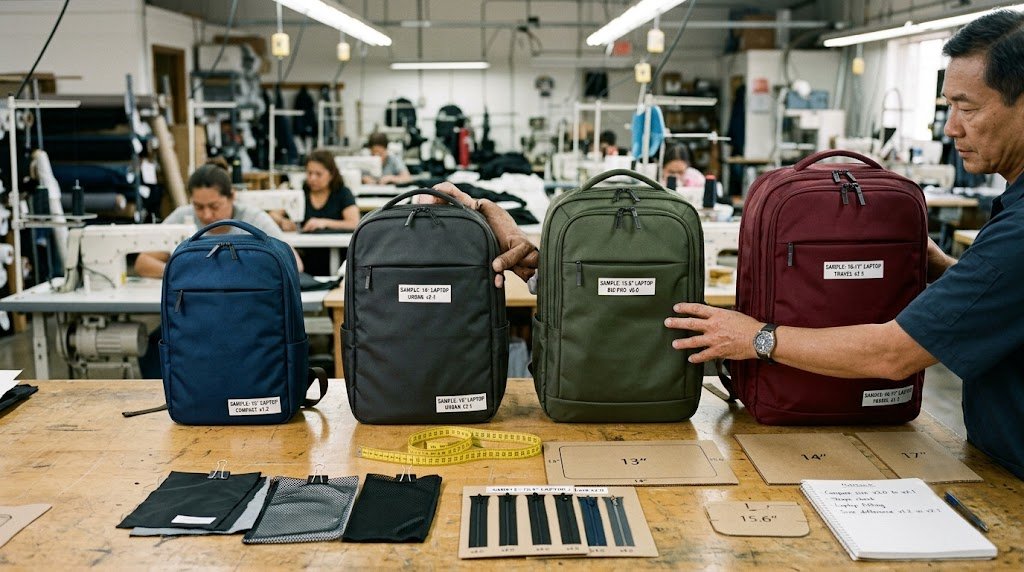
A laptop backpack size depends on both the laptop dimensions and the user’s daily carrying needs. A 15.6 inch laptop does not automatically require the same backpack size for every user because a student, office worker, and designer may carry completely different loads.
A general guide:
| Laptop Size | Recommended Backpack Capacity | Typical Use |
|---|---|---|
| 11–13 inch laptop | 15L–20L | Lightweight carry, students, minimal setup |
| 14 inch laptop | 18L–25L | Office, school, everyday commuting |
| 15–15.6 inch laptop | 20L–30L | Business, college, daily professional use |
| 16 inch laptop | 25L–30L+ | Larger devices, creators, heavier carry |
| 17 inch laptop | 30L+ | Gaming laptops, workstations, specialized equipment |
The table above is only a starting point. During laptop backpack development, we look beyond the screen size.
For example, a 15.6 inch laptop backpack for an office user may only need space for:
- Laptop
- Charger
- Documents
- Small accessories
But a 15.6 inch laptop backpack for a designer or engineer may also need space for:
- Large power adapters
- External devices
- Drawing equipment
- Additional tools
The laptop compartment is only one part of the backpack. The surrounding storage determines whether the backpack works well in real life.
A common mistake is making the laptop sleeve fit perfectly while leaving no usable space around it. A successful laptop backpack needs the right balance between device protection, storage capacity, and daily comfort.
Laptop Screen Size vs Actual Laptop Dimensions
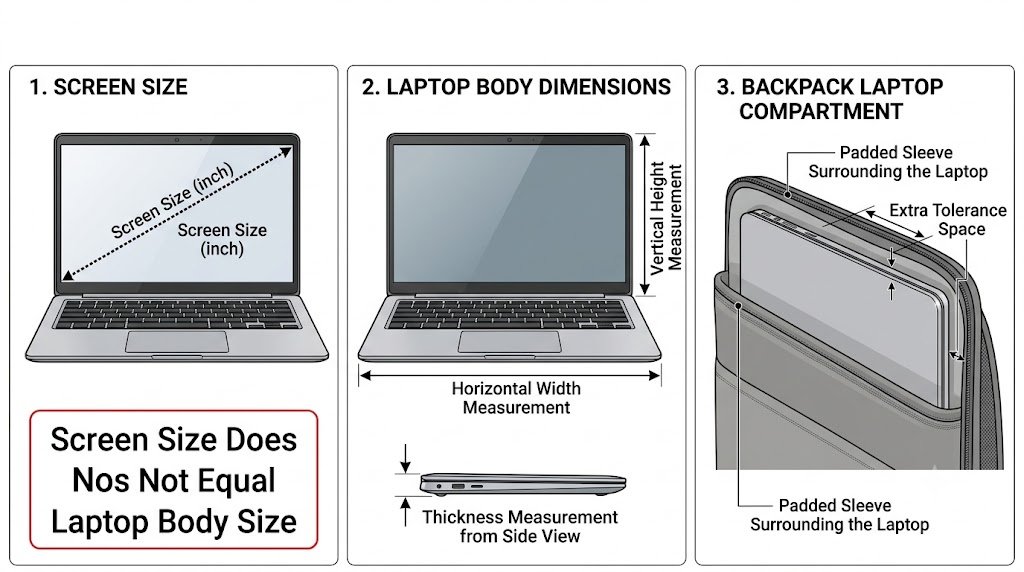
A laptop screen size does not tell the complete story when choosing a backpack. The number of inches refers to the diagonal screen measurement, but the actual laptop body size can be different depending on the model, design, and thickness.
For example, laptop manufacturers provide detailed physical specifications including width, depth, and thickness. These measurements are more useful than screen size alone when designing a laptop compartment. Apple provides official MacBook dimensions in its technical specifications as an example of how device measurements vary by model.
This is a mistake I see often during laptop backpack development. A buyer tells us they need a backpack for a “15.6 inch laptop,” but when the actual device arrives for sample fitting, the dimensions are different from what we expected.
The screen size is only the starting point. In our factory, we normally check:
- Laptop width and height — to confirm the sleeve opening is large enough
- Laptop thickness — especially for gaming laptops and professional devices
- Corner shape — rounded and sharp corners require different tolerance
- Accessories carried with the laptop — chargers, cables, mouse, and documents also need space
A laptop compartment that is too tight creates problems. The zipper becomes difficult to close, the foam gets compressed, and users may struggle to remove the laptop every day.
A compartment that is too loose has the opposite problem. The laptop moves around inside the bag, reducing protection and creating an unstable carrying experience.
This is why we do not design laptop backpacks only around screen sizes. We design around the complete user scenario.
| Laptop Category | Common Backpack Consideration |
|---|---|
| 11–13 inch laptops | Compact sleeve, lightweight daily carry |
| 14 inch laptops | Balanced protection and everyday storage |
| 15–16 inch laptops | More sleeve space and stronger structure |
| Large workstation laptops | Extra depth, padding, and load support |
For brands developing laptop backpacks, accurate laptop measurements during the sampling stage can prevent costly revisions later. A few millimeters in the laptop compartment can affect the entire backpack fit and user experience.
How Do You Measure a Laptop for a Backpack?
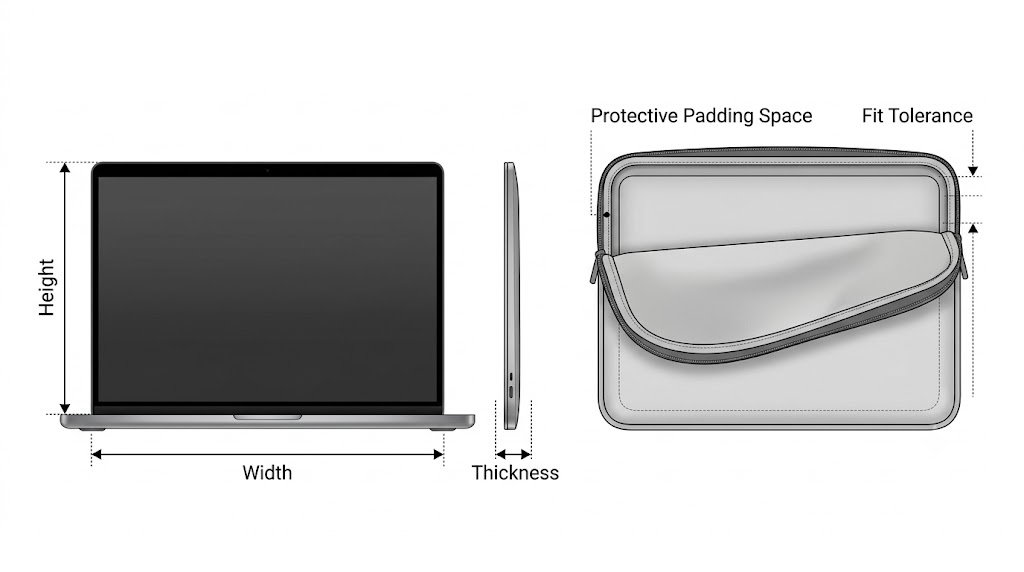
To choose the right laptop backpack size, measure the laptop’s width, height, and thickness instead of relying only on the screen size. These three measurements determine whether the laptop compartment will provide a proper fit.
In our factory, we do not design laptop compartments by screen inches alone. Before developing a laptop backpack, we check the actual device dimensions and add the necessary space for protection and daily use.
The basic measurements are:
| Measurement | How to Check | Why It Matters |
|---|---|---|
| Width | Measure from left side to right side | Determines sleeve length |
| Height | Measure from top to bottom | Determines compartment opening size |
| Thickness | Measure the laptop depth | Affects foam space and fit tolerance |
However, laptop backpack sizing is not only about matching measurements. During sample development, we also consider:
- Protective padding thickness — More foam improves protection but reduces available space.
- Laptop sleeve tolerance — Too tight creates daily frustration; too loose reduces stability.
- Charger and accessory storage — Real users rarely carry only the laptop.
- Opening design — A narrow zipper opening can make a correctly sized compartment difficult to use.
One mistake we often see is designing the laptop sleeve first and adding the rest of the backpack later. This can create a bag that protects the laptop but leaves no practical space for the user’s daily items.
A good laptop backpack should fit the device securely while leaving enough room for the complete carrying situation.
How Many Liters Does a Laptop Backpack Need?
Most laptop backpacks need between 20L and 30L for everyday use. A 20L backpack is usually enough for a laptop, charger, documents, and basic personal items, while a 25L–30L backpack provides more flexibility for students, professionals, and users carrying additional equipment.
A common mistake is choosing laptop backpack capacity based only on the laptop size. The laptop compartment and the total backpack volume solve two different problems.
The laptop compartment answers:
Will my device fit safely?
The backpack capacity answers:
Will I have enough space for everything else?
In our factory, we often see this difference during sample development. A customer may request a compact laptop backpack because they only consider the computer size. After adding the charger, notebook, mouse, water bottle, and daily accessories, the bag quickly becomes crowded.
A general capacity guide:
| Laptop Backpack Capacity | Best For | Typical Carry |
|---|---|---|
| 15L–20L | Light laptop use | Laptop, charger, notebook, small accessories |
| 20L–25L | Daily office or school use | Laptop, documents, accessories, personal items |
| 25L–30L | Professional or college use | Laptop, books, folders, extra clothing, equipment |
| 30L+ | Heavy-duty use | Large devices, tools, cameras, specialized gear |
One thing we have learned from backpack development is that bigger is not always better. Adding more volume can increase weight, change the balance of the bag, and make the backpack less comfortable when the user carries it every day.
The right laptop backpack capacity should match the user’s complete carrying situation, not just the size of the laptop.
What Makes a Laptop Backpack Fit Properly?
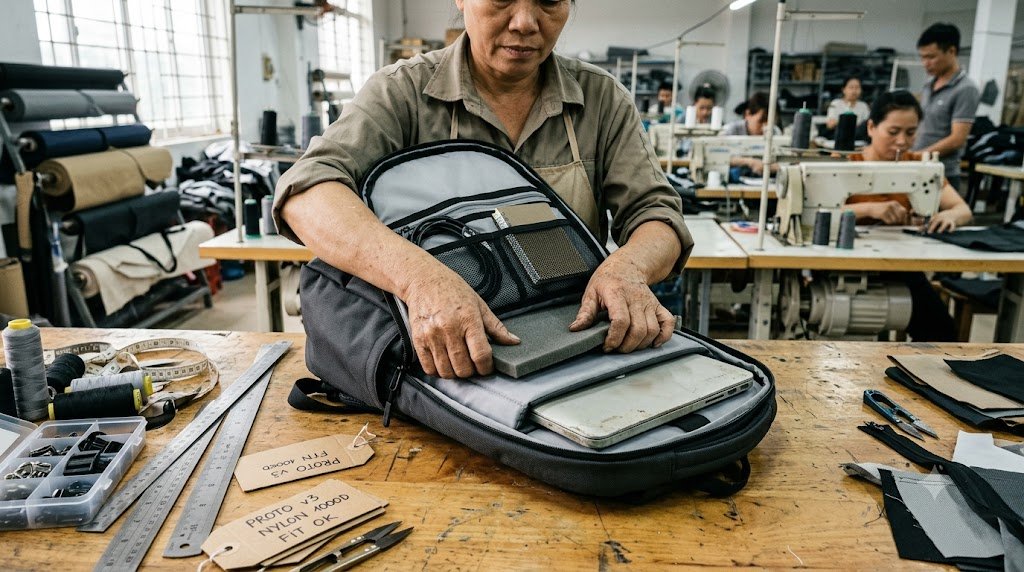
A good laptop backpack fit is not only about making the laptop fit inside the compartment. It is about creating the right balance between protection, accessibility, and usable space.
In laptop backpack development, we pay close attention to the small details that affect daily use. A laptop sleeve that looks correct on paper can still create problems when the bag is produced and used.
Comfort is not only about padding. Weight distribution and ergonomic design also affect how a backpack feels during long periods of carrying. Organizations such as OSHA provide general ergonomic principles focused on reducing physical strain through better design and work practices.
A proper laptop backpack fit depends on several factors:
| Design Factor | Why It Matters |
|---|---|
| Laptop compartment tolerance | Prevents the laptop from being too tight or moving around |
| Foam thickness | Protects the device but reduces available space |
| Sleeve opening design | Affects how easily users insert and remove the laptop |
| Bottom protection | Helps protect against impact when the backpack is placed down |
| Compartment position | Keeps the weight closer to the user’s back |
One issue we often see during sampling is adding too much protection without considering usability. Extra foam sounds better, but it can make the laptop compartment too tight and reduce the space available for chargers and accessories.
Another common problem is placing the laptop compartment too far from the back panel. The laptop may fit perfectly, but the backpack can feel heavier because the load sits away from the user’s body.
A well-designed laptop backpack should protect the device while keeping the entire carrying system balanced. The goal is not simply to create a larger compartment, but to create a backpack that feels comfortable in real daily use.
Common Laptop Backpack Sizing Mistakes
Many laptop backpack problems do not happen because the backpack is too small. They happen because the sizing decision was made using incomplete information.
During laptop backpack development, I have seen several mistakes repeated by buyers and designers.
Mistake 1: Designing Around Screen Size Only
A common mistake is using “13 inch” or “15.6 inch” as the only measurement standard.
The screen size tells you the diagonal display measurement, but it does not tell you the actual laptop body size, thickness, or shape.
A laptop sleeve designed only around screen size may become:
- Too tight for thicker devices
- Too loose for slimmer laptops
- Difficult to use after adding protective padding
Mistake 2: Making the Laptop Compartment Perfect but Forgetting Daily Items
I have seen samples where the laptop fits perfectly, but the final backpack does not work in real life.
The problem appears when users add:
- Charger
- Mouse
- Notebook
- Documents
- Water bottle
- Personal items
The laptop compartment is correct, but the backpack has no practical storage left.
Mistake 3: Adding Too Much Padding Without Testing Usable Space
More foam sounds safer, but it is not always better.
Extra padding can:
- Reduce internal capacity
- Increase backpack weight
- Make the compartment harder to access
Protection and usability need to be balanced.
Mistake 4: Ignoring Weight Distribution
A laptop backpack is not only a storage product. It is a carrying system.
A heavy laptop placed too far from the user’s back can make the backpack feel much heavier, even if the capacity is correct.
During development, we pay attention to:
- Laptop compartment position
- Back panel structure
- Shoulder strap design
- Overall load balance
The best laptop backpack size is not created by making the compartment as large as possible. It comes from understanding the complete user scenario and balancing protection, storage, and carrying comfort.
How Should Brands Develop Laptop Backpack Sizes?
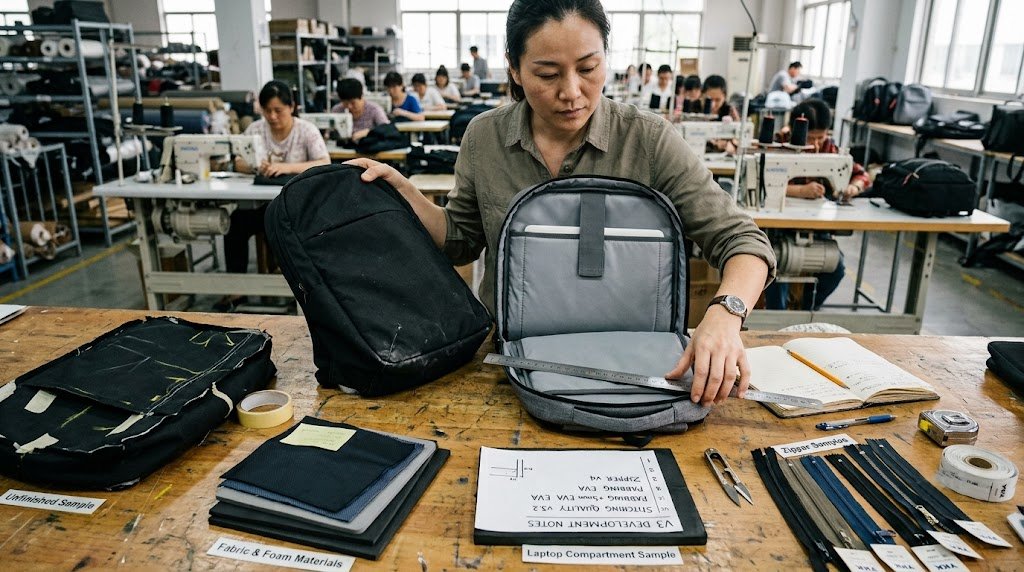
For backpack brands, choosing laptop backpack sizes is not only a product specification decision. It is a market positioning decision that affects usability, production cost, and customer satisfaction.
A common mistake during product development is starting with a laptop size and building the entire backpack around it. In reality, successful laptop backpacks need to consider the complete user scenario.
When we develop laptop backpacks, we usually look at:
| Development Factor | Why It Matters |
|---|---|
| Target user | Students, office workers, and professionals have different carrying needs |
| Laptop category | Different devices require different compartment dimensions |
| Daily load | Chargers, documents, accessories, and personal items affect capacity |
| Product positioning | Business, commuter, and lifestyle backpacks need different structures |
| Target price | Materials, padding, and construction affect final cost |
Building a Practical Laptop Backpack Size Range
A clear product line usually needs different capacity options:
| Capacity | Product Positioning | Typical User |
|---|---|---|
| 15L–20L | Compact laptop backpack | Students, light commuters |
| 20L–25L | Everyday laptop backpack | Office workers, college users |
| 25L–30L | Professional laptop backpack | Business users, creators, frequent carriers |
| 30L+ | Large equipment backpack | Designers, engineers, specialized users |
One mistake we often see in product development is creating a larger backpack simply because customers ask for “more space.” More volume does not always create a better product. It can increase weight, change the shape, and make the backpack less comfortable for daily use.
A successful laptop backpack balances device protection, storage efficiency, carrying comfort, and market demand.
For brands and bulk buyers, choosing the right laptop backpack size early in development can reduce sample revisions and create a product that better matches the target customer.
Final Wors: Choosing the Right Laptop Backpack Size
The right laptop backpack size is not determined by laptop screen size alone. A good choice balances device protection, usable space, comfort, and the user’s daily carrying needs.
For most users, a 20L–30L laptop backpack provides the best balance between portability and storage. However, the ideal design depends on the laptop dimensions, accessories, and intended use.
For brands and bulk buyers, choosing the right laptop compartment and capacity early can reduce development issues and improve the final product experience.
If you are developing laptop backpacks for your market, our team can help evaluate capacity, compartment structure, and production requirements based on your target users.– Conact Osgoodway
For general backpack capacity comparisons, see our backpack size guide.

Frequently Asked Questions About Laptop Backpack Sizes
What size laptop backpack do I need?
For most users, a 20L–30L laptop backpack is the most practical range. This provides enough space for a laptop, charger, documents, and daily essentials while remaining comfortable for everyday use.
Is a 15.6 inch laptop too big for a backpack?
No. A 15.6 inch laptop can fit in many 20L–30L laptop backpacks, but the actual fit depends on the laptop dimensions, thickness, and the design of the laptop compartment.
How many liters should a laptop backpack be?
Most everyday laptop backpacks are between 20L and 30L. Smaller 15L–20L backpacks work for light carry, while 30L+ backpacks are better for users carrying additional equipment.
Does a bigger laptop backpack provide better protection?
Not always. A larger backpack may provide more storage, but protection depends more on the laptop compartment design, padding, structure, and how securely the device is held.
Can a 16 inch laptop fit in a 15 inch laptop backpack?
It depends on the actual laptop dimensions and backpack sleeve measurements. Screen size labels are not always accurate indicators of physical fit, so checking device dimensions is recommended.
What is the difference between laptop size and laptop backpack size?
Laptop size usually refers to the screen measurement, while backpack size depends on the laptop compartment dimensions and total storage capacity. A backpack must fit both the device and the user’s daily carrying items.
Should a laptop backpack have extra space?
Yes. A good laptop backpack should leave enough room for chargers, documents, accessories, and personal items. A compartment that fits the laptop perfectly may still be too small for real daily use.